

Human in the loop (HITL) is an execution mode for agents that are expected to need people during normal work—not only when something goes wrong. You choose it when your design, risk, or compliance requires real human decisions on the path a run takes.Documentation Index
Fetch the complete documentation index at: https://docs.phrony.com/llms.txt
Use this file to discover all available pages before exploring further.

Why use HITL
| Situation | What HITL gives you |
|---|---|
| Regulated or high-stakes tools | A person approves or rejects specific tool calls (for example money movement, data export, or production changes). |
| Missing or sensitive inputs | The run stops in a known state until someone supplies a value, chooses an option, or confirms context. |
| Clear accountability | Work is not “the model said so”—there is a record of human consent or rejection tied to the run. |
| Anomaly (L1) + review | L1 rules can pause a tool attempt for a person (anomaly_review), separate from operation-level “approve every time”—but pause rules require HITL or Sub-agent mode, not Request. |
pause tasks appear when the agent is HITL or Sub-agent and the version has pause rules; Request mode can still use block / terminate_session L1 actions without pausing for review. The section below ties L1 to Review queues.
Require approval and Request mode
Require approval on an integration or operation tells Phrony that a human must approve before that tool’s HTTP or built-in call executes. That only works when the session’s root agent is in HITL execution mode. If you start a session with a Request-mode agent (API, schedule, test run, or trigger) and the model tries to call a tool that requires approval, the run does not pause and does not create an approval in Review. Phrony skips executing that call and returns an error to the model so it can react (for example choose a different path or explain that a HITL agent is required). Other tools in the same turn that do not require approval can still run. So: Request + Require approval on an operation is not a supported combination for “pause until someone clicks Approve.” Either switch the agent to HITL, or turn off approval on operations that a Request agent must call.How pauses become work
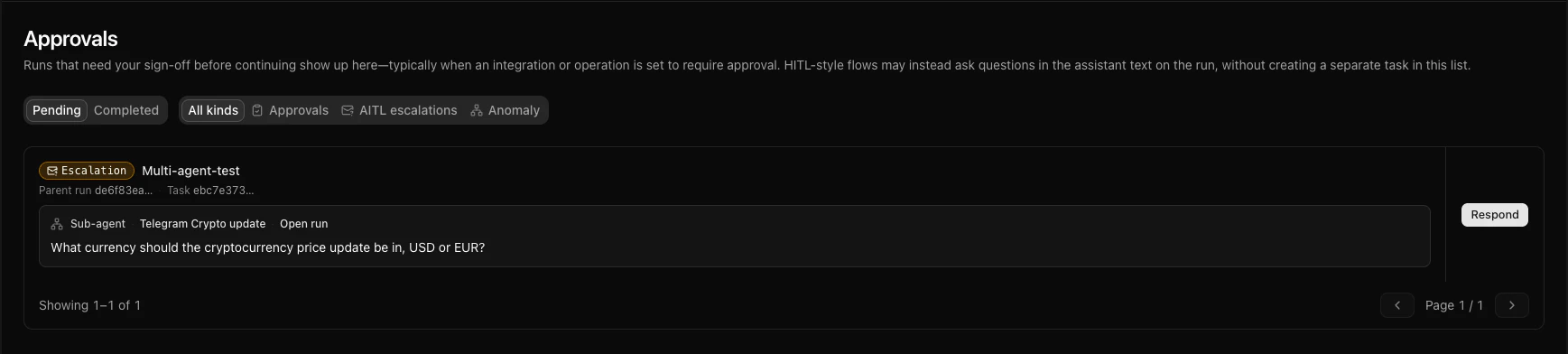
When a HITL run needs a person, Phrony creates a user task and typically moves the session into a waiting state until the task is completed (including rejection on an approval, which records a deliberate no-go). Tasks show up in Review (for example Approvals), in lists you can filter by kind, and in context on the run or session. There is no separate “HITL document” to author: tasks are emitted by the run. See User task for kinds (approvals, text/number prompts, L1 anomaly review and alerts, and how AITL escalations from multi-agent appear in the same queues with a different role).Anomaly control (L1) and HITL
Anomaly control (L1) is configured on a version (under Limits & safety on the agent page), not on the HITL flag alone. When it is on, you define rules on tool attempts (only for operations on that version’s allowlist). A rule can allow, block, pause for human review, or terminate the session, with strict precedence when several match—see L1 rules and evaluation.Pause rules require HITL or Sub-agent execution mode; Request agents cannot save them. Those pauses surface like other human steps: a user task in Review—commonly anomaly_review (approve or reject before the tool runs). Async signals may also appear as informational anomaly_alert tasks (acknowledgment-style). Guard lists incidents for triage. See User task — kinds.
HITL execution mode and L1 are complementary: use HITL for static operation-level “approve every time,” and L1 for pattern-based gating (arguments, per-run or per-session repetition, time-window follow-up) on top of the same or other tools.
Gating a tool call (operation-level)
For integrations, you can require HITL before a specific operation runs. When the root agent is in HITL mode and the model tries to call that tool, the run pauses and a user task asks someone to approve or reject the call. On a Request-mode root agent, that pause does not happen—see Require approval and Request mode. Configure approval in the Edit Operation flow (HTTP and built-in; labels are Require approval or Require approval (HITL) before execution depending on the connector). Connector-wide defaults and per-operation overrides are described under Operation level on the integration page.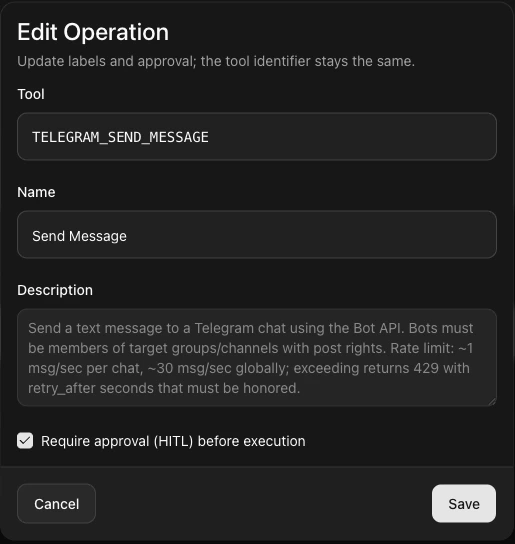
Where operators work
Review → Approvals (and related Review views) is the primary queue of pending and completed human steps across the workspace, with filters for task kind. From here you open the user task and act with the buttons or fields on the card.
In the session
The session (or run) view shows the step timeline next to the same work: you can see where the run stopped and open the user task in context. After you complete the task, the run resumes and new steps continue on the trace.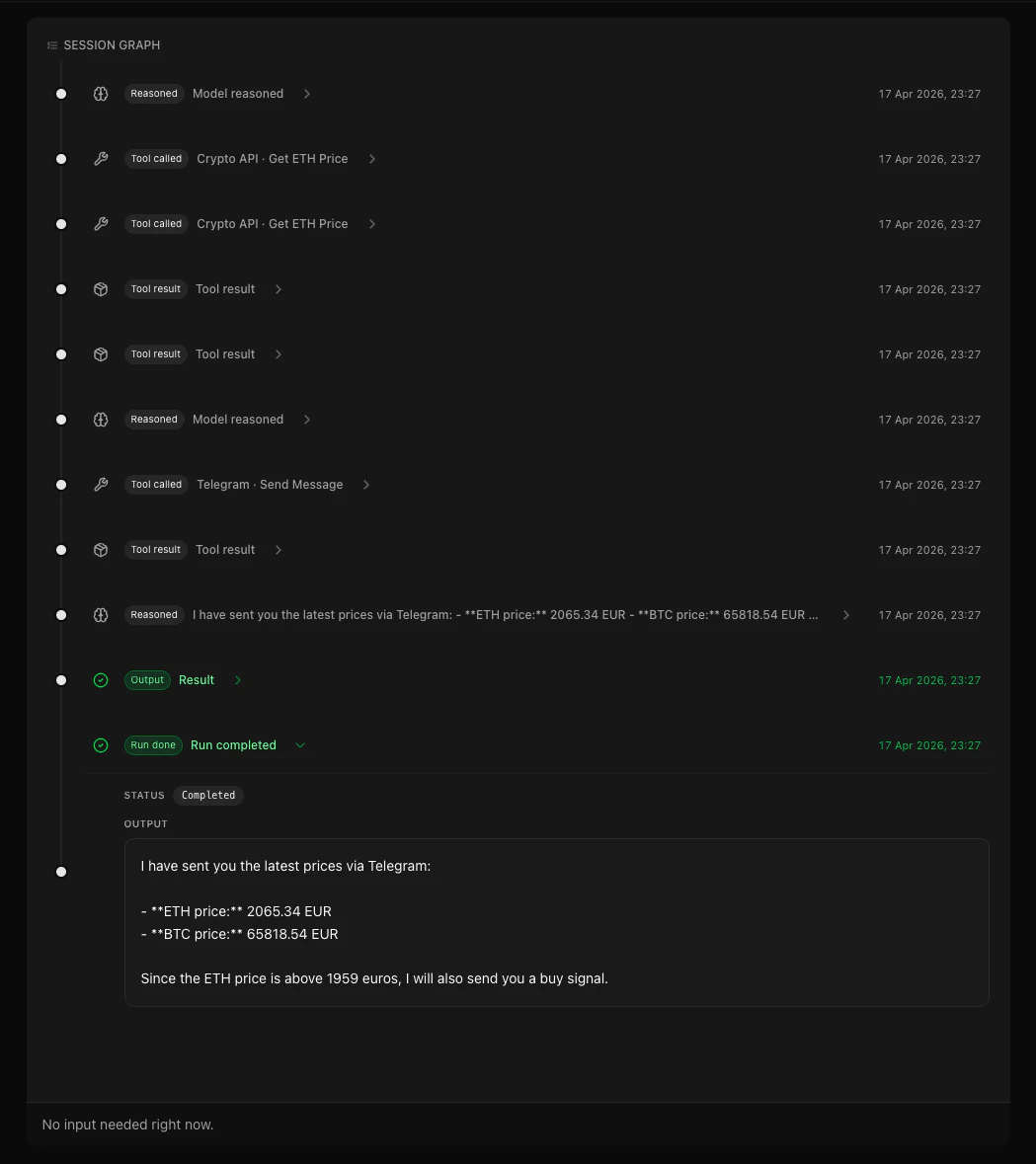
Triggers, API, and sub-agents
- HITL agents are still triggerable the same way as Request agents where the product offers Schedule, API, and (where applicable) Event triggers—Sub-agent mode does not use those entry points. See the execution mode table.
- Embedded API runs for a HITL agent can still pause for user tasks: your backend must not assume “fire and forget” if operations or flows require a person.
- In multi-agent trees, the root run’s mode governs external HITL (user tasks that surface to your operators and Review). Agent in the loop (AITL) is in-tree parent–sub-agent communication: read that guide for asks, escalation, and how it connects to the run tree. It is not a substitute for HITL on the root; both can appear in one session with different user task kinds.