

Documentation Index
Fetch the complete documentation index at: https://docs.phrony.com/llms.txt
Use this file to discover all available pages before exploring further.
Description
An LLM provider is your workspace’s configured link to a model service—a commercial API or a self-hosted endpoint—so Phrony can request completions using your credentials and whatever URL or region your organization requires. You need providers because every agent run calls a real model; without a provider, Phrony has nowhere to send those requests. Defining providers in one place keeps API keys and endpoints in a single, reviewable setup instead of scattering them across agents, and lets you maintain different connections (for example prod vs. test, or more than one vendor) in the same workspace.Properties
| What you configure | Description |
|---|---|
| Name | Your label for this connection (for example, “OpenAI — prod”). |
| Provider type | OpenAI, Azure OpenAI, Anthropic, or Self-hosted (OpenAI-compatible). |
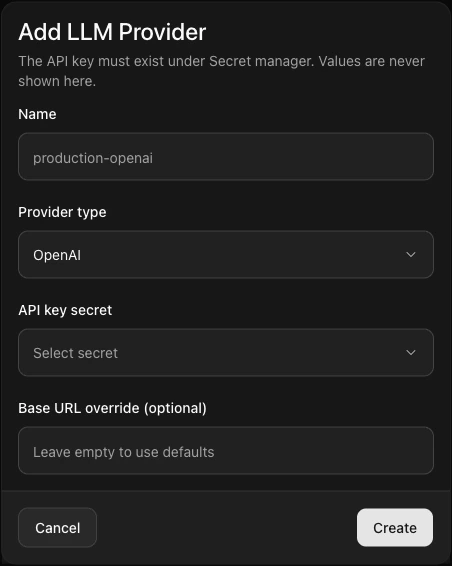
| API key secret | A secret you created in Secret Manager; you choose it by name. The raw key is never shown in lists or forms after you save. |
| Base URL override (optional) | Leave empty to use Phrony’s default endpoint for that vendor, or set a custom base URL (for example a gateway or self-hosted OpenAI-compatible host). Required when Provider type is Self-hosted. |
List and details
| View | What you see |
|---|---|
| List | Name, Provider, Base URL Phrony will call, Created. No API key column. |
| View details (read-only) | Resolved URL and which secret is linked—useful for troubleshooting. |
How to create, edit, and delete
Create: Sidebar → LLM Providers → Add Provider, or Quick Create → New LLM Provider. In Add LLM Provider, set Name, Provider type (OpenAI, Azure OpenAI, Anthropic, or Self-hosted (OpenAI-compatible)), API key secret from Secret Manager, and Base URL override if needed (required for Self-hosted) → Create. Edit: LLM Providers → row ⋯ → Edit → change Name, Provider type, API key secret, or Base URL override → Save changes. View details is read-only. Re-test agents that use this provider. Delete: There is no delete control on the list. Point agents at another provider first; to retire a row, follow your organization’s process or support. Unused providers can remain without affecting runs.Notes
- Your subscription may limit how many model connections you can create.
- The API key is never returned on screen or in list views after you save—only the fact that a credential is linked.
- If you change vendor or endpoint, run a short test in a non-production version before promoting.
Warnings
- Pointing a provider at the wrong credential causes authentication failures for every agent that uses it until you fix the secret.
- If you revoke a key in the vendor’s own console, Phrony will see generic model errors until you update the stored secret in Phrony to a valid key.
- Network path changes (new URL or region) can affect latency and data residency; validate against your org’s policies.