Documentation Index
Fetch the complete documentation index at: https://docs.phrony.com/llms.txt
Use this file to discover all available pages before exploring further.
Description
A user task is a human step while an agent session is running. The run waits until someone acts. Each task is tied to that session and run so operators see the right context.
| Situation | Typical human step |
|---|
| Sensitive tool use | Approve or reject before the call runs. |
| Missing input | Fill in a value, choose an option, or answer a text / number prompt. |
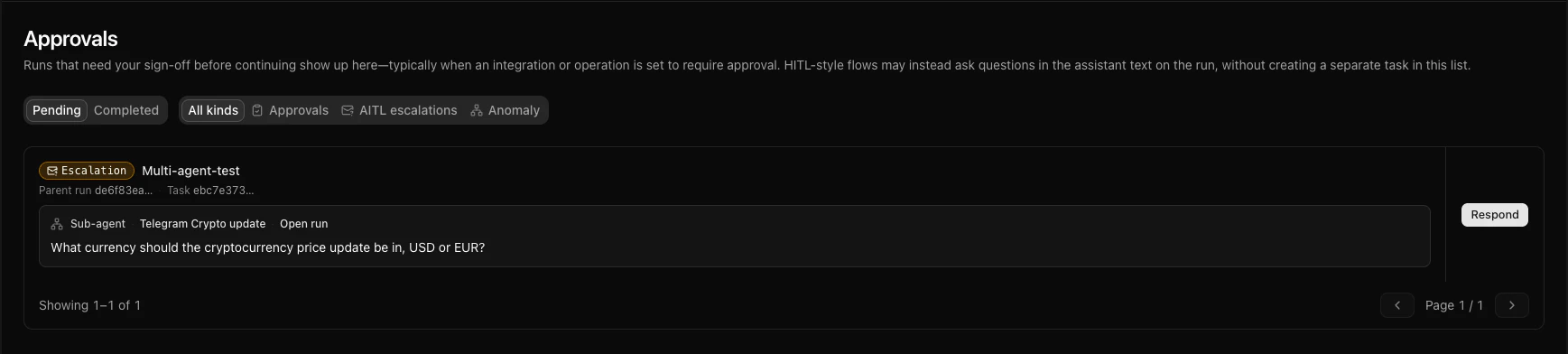
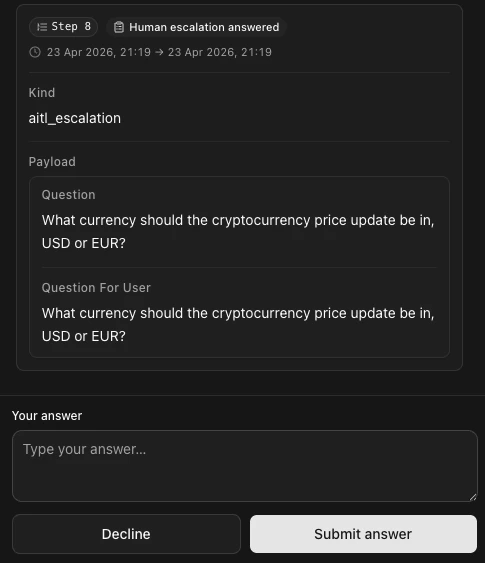
| Escalation (AITL) | Answer a question raised from a sub-agent run. |
| Guard / anomaly | Review a paused tool call or acknowledge an alert; triage incidents under Guard in the main sidebar (see Guard overview). |
Properties
| What you see | Description |
|---|
| Kind | Category of task (often a badge—e.g. Escalation or anomaly labels). See Kinds below. |
| Context | Which agent and session, plus a short summary of what is needed. |
Status
| Status | Meaning |
|---|
| Pending | Waiting for someone to act. |
| Completed | The person finished the step (including reject on an approval—the outcome records the rejection). |
| Cancelled | Rare; the run ended in a way that dropped the task. |
Outcome
After Completed, the product shows completion and, when relevant, a short summary of the choice (without unnecessary secrets).
Kinds
Each kind corresponds to a different human step. Internal identifiers (for APIs or support) appear in backticks where useful.
| Kind | When it happens |
|---|
approval | HITL operation approval: a pending tool call (for example HTTP) needs approve or reject before the run continues. |
hitl | Same behavior as approval; older tasks may still show this label. |
aitl_escalation | AITL: a question escalated from a sub-agent run; a person must answer so the run can continue. |
multi_option | The person picks one option from a list Phrony provides. |
text | The person enters a text answer. |
number | The person enters a numeric answer. |
anomaly_review | Guard / anomaly: a suspicious tool call is paused until someone approves or rejects it. |
anomaly_alert | Async detection alert: informational, non-blocking; the person acknowledges it. |
How to create, edit, and delete
Create: You do not create a user task from a menu. Phrony adds tasks when a run needs a human (for example, open an integration in Integrations, use the operation editor, and set Require approval (HITL) before execution for an operation).
Open the list: Sidebar → Review → Approvals. Use the Pending or Completed tab, then filter by kind: All kinds, Approvals, AITL escalations, or Anomaly.
Act on a task — from the list: Click a row to open the run with that task highlighted, or use the actions on the card (Approve / Reject, text fields, acknowledgements, and so on).
Act on a task — from a run: Open Agents, select an agent, then open Sessions or a session from the Dashboard and open the run. You resolve approvals and forms in the run view.
Edit: Tasks are not edited like a saved draft. Approve, reject, or submit the requested input once. If the task is wrong, your process may be to reject the approval or to terminate the session from Recent sessions on the Dashboard (see the Session page), not to “fix” the task text.
Delete / remove from queue: You do not delete a user task from the list. A user task is Completed when someone performs the action the task asked for, or when the run ends in a way that finishes that task. If the page looks out of date, refresh. If you expected a Pending task and the list is empty, a teammate may have already finished it.
Phrony API
If you send input or messages to a run from your own systems, you can often complete the same user tasks you would in the Phrony dashboard (for example, approvals, prompts, and conversational follow-ups). Not every user task can be completed through the API—certain escalations from multi-agent runs, and some guard- or alert-style steps, must be completed in the Phrony dashboard instead.
Warnings
- Approving the wrong run or the wrong action can have serious effects; when in doubt, open the full session first.
- Rejection paths may surface as user-visible errors downstream—train operators on your intended messaging.
- Sensitive details can appear in task context; restrict who can view Pending tasks the same way you restrict other operational access.
- A stale page can show a task that is no longer Pending; refresh before you submit to avoid a conflict message.